
Cloning an order creates a new WooCommerce order based on an existing one. It is useful when a customer wants a similar purchase, a team takes orders by phone, or a returned item needs to be handled in a separate order. The new order still needs a human review before payment or fulfilment.
WooCommerce does not include a general Clone Order action in its admin order list. Clone / Duplicate Orders for WooCommerce adds that action to the Orders list and individual order screens. The free plugin supports WooCommerce High Performance Order Storage (HPOS).
Before cloning: choose the right source order
Open the original order and check its products, customer, shipping address, tax, coupons, and fees. If the customer is placing a new order at today's prices, note that the free plugin starts with the original order prices. You may need to edit the cloned order or use a different pricing rule.
Never treat a clone as proof of payment. By default, the free plugin creates the new order in Pending payment status and excludes the original transaction ID, payment method, and a curated list of gateway fields. The new order needs its own payment and fulfilment decision.
Clone an order from the WooCommerce Orders list
- In WordPress admin, open WooCommerce → Orders.
- Find the order you want to use as the starting point.
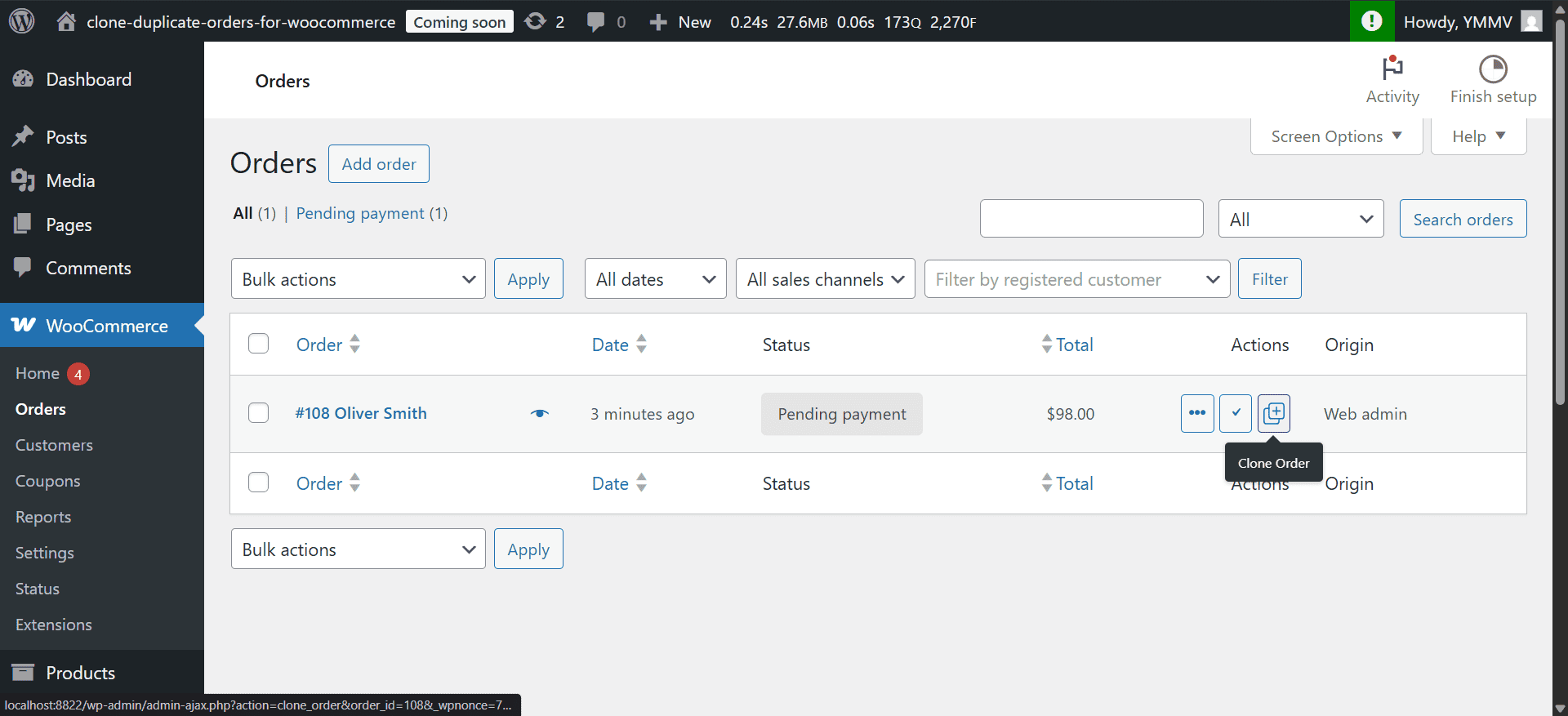
- In the Actions column, select the Clone Order icon.
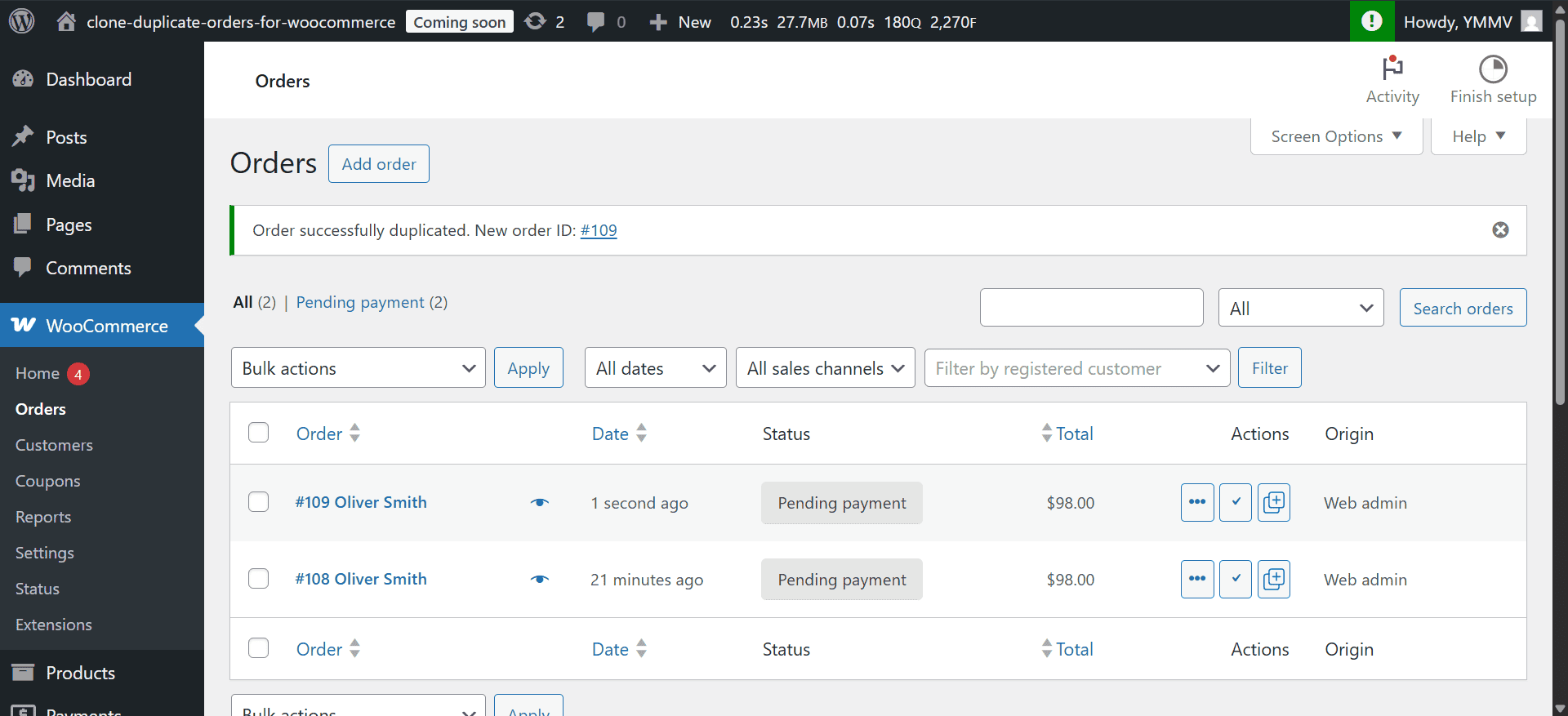
- Follow the success notice to the newly created order.
- Review the new order before sending a payment link or changing its status.
If you cannot see the Actions column, open Screen Options at the top of the Orders page and enable it.
The success notice links to the newly created order. It has its own order ID and starts in Pending payment status.
Clone from an individual order
Open an existing order. The plugin also adds a Clone Order metabox and an entry in Order actions. These locations are useful when you are already checking the original order's details.
For a quick reference to the admin controls, use the Clone Order documentation. The rest of this guide explains when to clone and what to review before the new order is paid or fulfilled.
What the free plugin copies
The free version copies the source order's billing and shipping details, line items, original item prices, shipping choice, customer note, and supported custom fields. It creates a new order number and date, adds a note identifying the source order, and leaves the original order untouched.
It does not carry over the original order notes or known payment fields such as the transaction ID. The payment-field exclusion list cannot cover every third-party extension, so check custom fields before sharing the new order. Stock is not reduced simply because the Pending payment clone was created. Out-of-stock products can still appear in the clone, so check availability before processing it. The exact stock effect later depends on the new order's status and your WooCommerce settings; see WooCommerce order statuses.
Review the new order before processing it
Use this checklist each time:
- Customer: Confirm this is the right buyer and update billing or shipping details if needed.
- Products and quantity: Remove returned or unavailable items and add replacements.
- Prices and discounts: Decide whether to keep the historical price or use current prices.
- Tax and shipping: Recheck amounts for the new buyer, destination, and current rates.
- Payment: Arrange a new payment; the old transaction was not copied.
- Status and stock: Leave the order Pending payment until your normal payment and fulfilment steps are ready.
- Custom fields: Check any fields added by checkout, invoicing, or fulfilment extensions.
For exchanges, complete the refund or return workflow on the original order separately. Then adjust the clone so it represents what will actually be shipped and charged.
Clone or duplicate: is there a difference?
In everyday WooCommerce use, clone, copy, and duplicate usually describe the same action: creating a new order from an existing one. The important distinction is between the source order and the new order. A clone does not turn a paid order into another paid order.
The free Clone / Duplicate Orders for WooCommerce provides the one-order-at-a-time admin workflow. Its developer filters can change selected defaults. Whatever term your team uses, review the new order before collecting payment or fulfilling it.